- 책 또는 웹사이트의 내용을 복제하여 다른 곳에 게시하는 것을 금지합니다.
- 책 또는 웹사이트의 내용을 발췌, 요약하여 강의 자료, 발표 자료, 블로그 포스팅 등으로 만드는 것을 금지합니다.
윈도우에서 Subversion 커밋 메일 보내기
이재홍 http://www.pyrasis.com 2007.9.30 버전 1.0
윈도우(Windows)에서 Subversion 커밋 메일을 보내는 방법을 설명하겠습니다. Windows XP Professional를 기준으로 설명하겠으며, Windows Server 2003도 똑같이 적용됩니다.
Subversion 커밋 메일을 보내는 방법은 Perl 스크립트를 이용하는 방법과 Python 스크립트를 이용하는 방법 2가지가 있습니다. Perl 스크립트는 Windows에 내장된 IIS SMTP 서버를 사용할 것이고, Python 스크립트는 GMail 계정을 이용할 것입니다.
목차
Perl
commit-email.pl 스크립트를 사용하도록 하겠습니다. 이 스크립트는 Subversion 소스의 tools/hook-scripts에 있는 파일이며, 한글 로그 메시지, 소스를 처리할 수 있도록 수정한 것입니다.
설치할 파일들 구하기
Subversion
http://subversion.tigris.org/servlets/ProjectDocumentList?folderID=91에서 Windows 용 최신 버전을 받습니다. 인스톨러 버전을 받습니다.
Active Perl
ActivePerl-5.8.8.820-MSWin32-x86-274739.msi을 받습니다. 버전은 5.8.8.820을 받아야 하며, 5.8.8.822는 메일을 보낼 때 한글이 깨지는 문제가 있습니다.
받은 파일들은 기본 설정대로 설치합니다.
IIS SMTP 서버 설치
Windows의 경우 유닉스, 리눅스와는 달리 sendmail이 없습니다. 따라서 IIS SMTP 서버를 설치하여 메일을 보내도록 하겠습니다. Windows XP Professional에서도 IIS SMTP 서버를 설치하여 사용할 수 있습니다. Windows Server 2003의 경우 "관리도구 -> 서버 구성 마법사"를 통하여 설치해주시기 바랍니다.
"제어판 -> 프로그램 추가/제거 -> Windows 구성 요소 추가/제거"
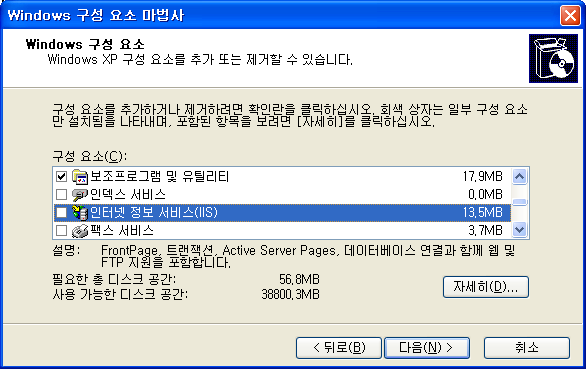
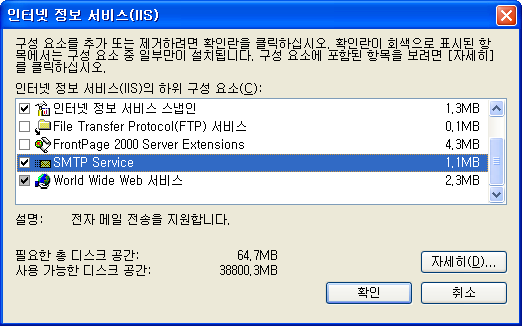
인터넷 정보 서비스를 더블클릭 하여 SMTP Service를 체크합니다.
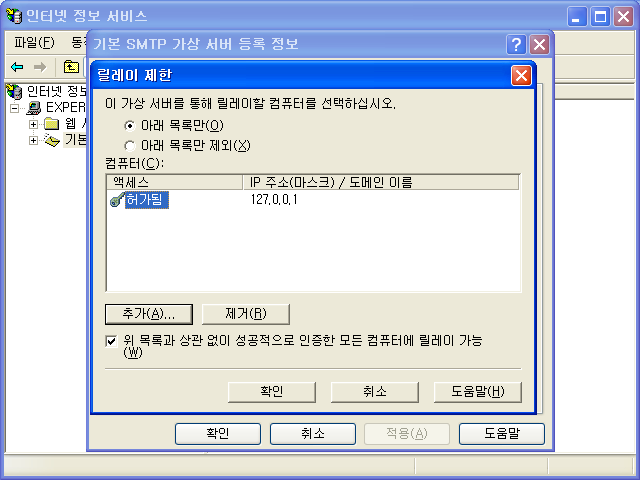
SMTP 서버를 설치 한 뒤 릴레이 설정을 해줍니다. "제어판 -> 관리도구 -> 인터넷 정보 서비스 -> 기본 SMTP 가상 서버의 속성 -> 엑세스 -> 릴레이"에서 추가 버튼으로 127.0.0.1을 추가합니다.
설정
C:\tools라는 디렉터리를 만들고 이 디렉터리에 commit-email.pl 파일을 복사합니다. commit-email.pl 파일에서 svnlook.exe의 경로를 설정합니다. Subversion을 설치파일로 기본 설치했다면 경로는 아래와 같을 것입니다. 따로 압축 파일로 설치했거나 경로를 변경하였다면 svnlook.exe가 있는 경로로 설정해줍니다.
# Svnlook path.
my $svnlook = "C:\\Program\ Files\\Subversion\\bin\\svnlook.exe";
저장소의 hooks 디렉터리에 post-commit.cmd 파일을 아래의 내용으로 만듭니다.
@ECHO OFF
REM POST-COMMIT HOOK
REM
REM The post-commit hook is invoked after a commit.  Subversion runs
REM this hook by invoking a program (script, executable, binary, etc.)
REM named 'post-commit' (for which this file is a template) with the
REM following ordered arguments:
REM
REM   [1] REPOS-PATH   (the path to this repository)
REM   [2] REV          (the number of the revision just committed)
REM
REM The default working directory for the invocation is undefined, so
REM the program should set one explicitly if it cares.
REM
REM Because the commit has already completed and cannot be undone,
REM the exit code of the hook program is ignored.  The hook program
REM can use the 'svnlook' utility to help it examine the
REM newly-committed tree.
REM
REM On a Unix system, the normal procedure is to have 'post-commit'
REM invoke other programs to do the real work, though it may do the
REM work itself too.
REM
REM Note that 'post-commit' must be executable by the user(s) who will
REM invoke it (typically the user httpd runs as), and that user must
REM have filesystem-level permission to access the repository.
REM
REM On a Windows system, you should name the hook program
REM 'post-commit.bat' or 'post-commit.exe',
REM but the basic idea is the same.
REM
REM Here is an example hook script, for a Windows CMD.exe interpreter:

SET REPOS=%1
SET REV=%2

SET PROJECT=sample
SET HOSTNAME=sample.com
SET EMAIL=source-changes@sample-mail.com
SET ENC=euc-kr

SET TOOLS_DIR=C:\tools

%TOOLS_DIR%\commit-email.pl %REPOS% %REV% -e %ENC% -h %HOSTNAME% -s %PROJECT% %EMAIL%
- PROJECT에는 현재 프로젝트의 이름을 지정합니다.
- HOSTNAME에는 저장소 서버의 이름(도메인 네임)을 지정합니다.
- EMAIL에는 커밋 메일을 받을 메일이나 메일링 리스트의 주소를 지정합니다.
- ENC에는 소스코드가 인코딩된 방식입니다. 소스코드가 UTF-8로 인코딩 되어 있다면 ENC=으로 지정합니다(ENC 설정이 올바르지 않을 경우 메일에 포함되는 Diff에서 한글이 정상적으로 출력되지 않을 수 있습니다).
- TOOLS_DIR은 commit-email.pl 파일이 있는 디렉터리 입니다.
메일 테스트 방법
커밋을 한것과 같은 효과를 내어 메일 테스트를 해볼 수 있습니다.
명령 프롬프트를 실행하고 다음과 같이 명령을 내리면 커밋 로그를 메일로 직접 보낼 수 있습니다.
C:\repos\sample\hooks>post-commit.cmd c:\repos\sample 20
c:\repos\sample은 저장소의 경로입니다. 20은 커밋 로그 메시지를 보내고자 하는 특정 리비전입니다.
Subversion에서는 버전을 전체 리비전으로 관리하므로 메일은 리비전 단위로 보내야 합니다.
커밋 메일을 받는 주소가 GMail이면 개인 PC에서 IIS SMTP 서버로 메일을 보낼 경우 스팸으로 처리되어 메일이 도착하지 않을 수도 있습니다.
Python
mailer.py 스크립트와, mailer.conf.example를 사용하도록 하겠습니다. 이 스크립트는 Subversion 소스의 tools/hook-scripts에 있는 파일이며, Diff 결과에서 한글을 처리할 수 있도록 하고 Windows에 맞게 수정한 것입니다.
설치할 파일들 구하기
Subversion
http://subversion.tigris.org/servlets/ProjectDocumentList?folderID=91에서 Windows 용 최신 버전을 받습니다. 인스톨러 버전을 받습니다.
Python
http://python.org/download/에서 Python 2.5 인스톨러 버전을 받습니다.
Subversion Python Binding
http://subversion.tigris.org/servlets/ProjectDocumentList?folderID=91에서 Subversion과 Python 버전에 맞는 인스톨러 버전을 받습니다. Subversion 1.4.5, Python 2.5라면 svn-python-1.4.5.win32-py2.5.exe를 받습니다.
Diffutils
http://sourceforge.net/project/showfiles.php?group_id=23617&package_id=16423에서 인스톨러 버전을 받습니다.
받은 파일들은 기본 설정대로 설치합니다.
설정
mailer.py는 IIS SMTP 서버와 GMail 계정을 이용하여 메일을 보낼 수 있습니다. IIS SMTP 서버 설치방법은 IIS SMTP 서버 설치를 참조하세요.
C:\tools라는 디렉터리를 만들고 이 디렉터리에 mailer.py, mailer.conf.example 파일을 복사합니다. mailer.conf.example는 mailer.conf로 이름을 변경합니다.
IIS SMTP 서버
mailer.conf에서 smtp_hostname를 설정합니다. Subversion 저장소가 있는 컴퓨터에 IIS SMTP 서버를 설치했다면 localhost(127.0.0.1)입니다. 다른 서버에 설치했다면 해당 서버의 IP 주소나 도메인을 지정합니다.
This option specifies the hostname for delivery via SMTP.
smtp_hostname = localhost
GMail 계정
GMail 계정을 이용하여 커밋 메일을 보낼 수 있습니다. mailer.conf에서 SMTP 서버와, GMail ID, 암호를 설정합니다.
# This option specifies the hostname for delivery via SMTP.
smtp_hostname = smtp.gmail.com:587
# Username and password for SMTP servers requiring authorisation.
smtp_username = example@gmail.com
smtp_password = (이메일 암호)
mailer.py의 SMTPOutput 클래스 finish 함수를 아래와 같이 수정합니다.
def finish(self):
  server = smtplib.SMTP(self.cfg.general.smtp_hostname)
  if self.cfg.is_set('general.smtp_username'):
    server.ehlo()         # for GMail
    server.starttls()     # for GMail
    server.ehlo()         # for GMail
    server.login(self.cfg.general.smtp_username,
                 self.cfg.general.smtp_password)
  server.sendmail(self.from_addr, self.to_addrs, self.buffer.getvalue())
  server.close()          # server.quit() to server.close()
Diff, 받는 메일 주소 설정
환경 변수의 Path에 C:\Program Files\GnuWin32\bin를 추가합니다. 환경 변수에 추가한 뒤 재부팅을 해야 정상적으로 실행됩니다.
Diff 설정과, 보내는 메일 주소 받는 주소를 설정합니다. 받는 메일 주소는 여러개를 지정할 수 있습니다(공백으로 구분).
# This is not passed to the shell, so do not use shell metacharacters.
# The command is split around whitespace, so if you want to include
# whitespace in the command, then ### something ###.
diff = diff.exe -u -L %(label_from)s -L %(label_to)s %(from)s %(to)s

# The default From: address for messages.  If the from_addr is not
# specified or it is specified but there is no text after the `=',
# then the revision's author is used as the from address.  If the
# revision author is not specified, such as when a commit is done
# without requiring authentication and authorization, then the string
# 'no_author' is used.  You can specify a default from_addr here and
# if you want to have a particular for_repos group use the author as
# the from address, you can use "from_addr =".
from_addr = mailer@sample.com

# The default To: addresses for message.  One or more addresses,
# separated by whitespace (no commas):
to_addr = source-changes@sample-mail.com
저장소의 hooks 디렉터리에 post-commit.cmd 파일을 아래의 내용으로 만듭니다.
@ECHO OFF
REM POST-COMMIT HOOK
REM
REM The post-commit hook is invoked after a commit.  Subversion runs
REM this hook by invoking a program (script, executable, binary, etc.)
REM named 'post-commit' (for which this file is a template) with the
REM following ordered arguments:
REM
REM   [1] REPOS-PATH   (the path to this repository)
REM   [2] REV          (the number of the revision just committed)
REM
REM The default working directory for the invocation is undefined, so
REM the program should set one explicitly if it cares.
REM
REM Because the commit has already completed and cannot be undone,
REM the exit code of the hook program is ignored.  The hook program
REM can use the 'svnlook' utility to help it examine the
REM newly-committed tree.
REM
REM On a Unix system, the normal procedure is to have 'post-commit'
REM invoke other programs to do the real work, though it may do the
REM work itself too.
REM
REM Note that 'post-commit' must be executable by the user(s) who will
REM invoke it (typically the user httpd runs as), and that user must
REM have filesystem-level permission to access the repository.
REM
REM On a Windows system, you should name the hook program
REM 'post-commit.bat' or 'post-commit.exe',
REM but the basic idea is the same.
REM
REM Here is an example hook script, for a Windows CMD.exe interpreter:

SET REPOS=%1
SET REV=%2

SET TOOLS_DIR=C:\tools

%TOOLS_DIR%\mailer.py commit %REPOS% %REV% %TOOLS_DIR%\mailer.conf
- TOOLS_DIR은 mailer.py, mailer.conf 파일이 있는 디렉터리 입니다.
메일 테스트 방법
커밋을 한것과 같은 효과를 내어 메일 테스트를 해볼 수 있습니다.
명령 프롬프트를 실행하고 다음과 같이 명령을 내리면 커밋 로그를 메일로 직접 보낼 수 있습니다.
C:\repos\sample\hooks>post-commit.cmd c:\repos\sample 20
c:\repos\sample은 저장소의 경로입니다. 20은 커밋 로그 메시지를 보내고자 하는 특정 리비전입니다.
Subversion에서는 버전을 전체 리비전으로 관리하므로 메일은 리비전 단위로 보내야 합니다.
커밋 메일을 받는 주소가 GMail이면 개인 PC에서 IIS SMTP 서버로 메일을 보낼 경우 스팸으로 처리되어 메일이 도착하지 않을 수도 있습니다.
 Kubernetes


저작권 안내
이 웹사이트에 게시된 모든 글의 무단 복제 및 도용을 금지합니다.- 블로그, 게시판 등에 퍼가는 것을 금지합니다.
- 비공개 포스트에 퍼가는 것을 금지합니다.
- 글 내용, 그림을 발췌 및 요약하는 것을 금지합니다.
- 링크 및 SNS 공유는 허용합니다.